



 |
|
 | |
 | |
 | |
 | |
 | |
 | |
 | |
|









Icon Creator to Edit Icons

IconXP 3.39 is an icon creator for Windows. It allows professional and amateur graphic artists alike to create and edit icons with smooth transparency.
Trial limitations: 30-day trial period, nag-screen. Download (6.6 MB):  exe
zip exe
zip
 How to uninstall IconXP from a computer How to uninstall IconXP from a computer
View awards IconXP has received:
How to Edit Icons with XP Icon CreatorA short article about an icon creator program. It includes uses of the icon program and compatibility to different systems. It also includes link for download.Your website or application is ready for launching; all that you need are a couple more icons to make your product really stand out. You browse and search for that perfect but you just can't find one that truly satisfies you. Which one may be the perfect solution? Design your own icon! You can download an easy icon creator at IconXP page. It creates icons for windows XP which you can use in your websites, applications, presentations, toolbars and other programs. It makes designing fun and easy for every one. Novice designers or experts can truly appreciate the simplicity and ease of use of this icon program. Download icon maker program now and start creating a set of icons for personal or commercial use. You can use the icon button you designed for your own projects, or for others. There is a wide niche for well-designed and creative icon buttons. With the icon creator you can merge both your computer skills and artistic talent to produce online art that will be displayed for everyone to view. But even if you're not that computer-savvy or artistic, designing icons will be a breeze by using this icon program. You can import any image in various formats directly into the icons. It will save your time and you will also be able to find the nice icons. Export the icons to ICPR, ICO, JPEG, BMP, PNG, CUR, GIF, XPM, RC, XBM, WBMP and Photoshop PSD files. And you can even capture screen images. It would be easy to modify or change the color, saturation and intensity of the image; change it to grayscale or rotate and roll the images. Create icons of various sizes either standard or custom. You can edit icons for windows XP. Bring customizing to a new level and modify the icons used for my computer, recycle bin, my documents and others for a more personalized desktop. The icon creator is compatible with any windows operating system such as Windows 95/98/ME/2000/NT/XP/2003/Vista/Seven. So if you like to try designing your own icons and buttons download the icon maker now at IconXP page, and start being creative. It adds the perfect finishing touch to that website or application you are designing. Or earn more revenue by marketing your icons.
| |||||||||
|
Icon Software | Graphic Software | Icons Downloads | Order Icons | Windows Icon Sets | Support
Privacy Policy | Terms of Use | Refund Policy Copyright © 2000-2022 Aha-Soft. All rights reserved. |
 Overview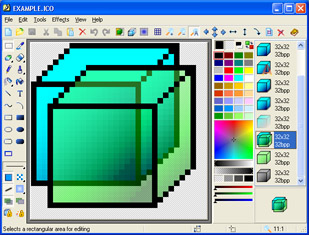





|
